| Screen Map |
         o o
   ooooooOoooooo
  / .ooooX o... \
 |   o     o     |
ooo  o     o     oooooo.
. .  o           .
     o            \
     o             o
     o              \
o |
X = Current Screen
o = Demo Screens
O = Main Nav. Screen
. = Not-Implemented | |
|
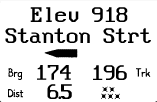
Waypoint Elevation Screen
| Displayed: |
 |
• |
Active Waypoint Elevation
The Elevation number comes from the waypoint
database created and stored in the PC. |
|
• |
Graphical Turn Indicator, proportional to Bearing - Track |
|
• |
Bearing to the active waypoint |
|
• |
Track to the active waypoint |
|
• |
Distance to the active waypoint |
|
• |
Number of satellites acquired |
|
• |
The "Engine Run" symbol is displayed as a large, dark "X"
in the lower right corner. |
| • |
Press UP or DOWN to view information about the active waypoint. |
| • |
Press LEFT or RIGHT to go to other screens. |
| • |
Pressing GO always brings you back to the Main Navigation Screen. | | |