| Screen Map |
         o o
   ooooooOXooooo
  / .ooooo o... \
 |   o     o     |
ooo  o     o     oooooo.
. .  o           .
     o            \
     o             o
     o              \
o |
X = Current Screen
o = Demo Screens
O = Main Nav. Screen
. = Not-Implemented | |
|
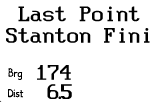
Last Active Waypoint
| Displayed: |
 |
• |
Name of the most recent active waypoint |
|
• |
Bearing to the most recent active waypoint |
|
• |
Distance to the most recent active waypoint |
| • |
Press GO to navigate to the displayed waypoint and return to the Main
Navigation Screen. This allows the pilot to easily switch between two waypoints
of interest. |
| • |
Press LEFT or RIGHT to view other screens. | | |