| Screen Map |
         o o
   ooooooOoooooo
  / .ooXoo o... \
 |   o     o     |
ooo  o     o     oooooo.
. .  o           .
     o            \
     o             o
     o              \
o |
X = Current Screen
o = Demo Screens
O = Main Nav. Screen
. = Not-Implemented | |
|
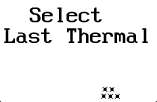
Select a Thermal
| • |
Press GO to navigate to this thermal. This, of course, also takes you back
to the Main Navigation Screen. (In this demo, the active waypoint is not
changed when GO is pressed.) |
| • |
Press UP or DOWN to select a different thermal to navigate to. |
| • |
Press LEFT or RIGHT to go to other screens.
|
Note: When navigating to a thermal, pressing UP in the Main
Navigation Screen will display the date and time (UTC) the thermal was marked. | |